
 Bosanski
 Deutsch
SEO Bee Crawl Budget: filter pages and pagination for WooCommerce
WooCommerce plugin that decides which filter pages of your shop Google may index, for example “black T-shirts”. All other filter combinations stay out, and the pagination gets to any page of a category in a few clicks. The first 14 days are free, after that one site costs €20 a year.
Version 1.0.0 · WordPress 6.3+ · PHP 7.4+ · WooCommerce 8.0+
Only the filter pages people search for
Every filter in a shop creates new addresses, and every combination creates more. A few categories quickly turn into thousands of addresses that Google crawls although hardly anyone searches for them. The plugin lets the useful ones into the index and keeps the rest out.
Single filters with a threshold
A filter value goes into the index when it shows at least 6 products. You set that number yourself. For each attribute you choose “Automatic”, “Only chosen values” or “Never index”.
Pairs you allow
Two filters together, such as brand and colour, go into the index only if you tick that pair or enter the exact combination. Three or more filters always stay out.
Own tags for indexed filters
An indexed filter page gets a canonical to itself, with the parameters always in the same order. It also gets its own title, an H1 and a short meta description when the category has none.
Links Google can follow
WooCommerce puts nofollow on every filter link. The plugin removes it only from links to indexed filter pages. All other filter links stay nofollow.
Jump pagination
Next to the neighbouring pages, the first and the last, the pagination shows every n-th page as a shortcut. That puts page 120 of 209 a few clicks away. You set the colours and shape of the page numbers, or leave them to the theme.
Watch first, then apply
After activation the plugin only watches and changes not a single tag. The rules start working after a click on “Apply rules”. “Back to watch only” undoes everything at once and keeps your settings.
What Google gets on filter pages
The default values. Where it says “adjustable”, you set the value in the settings.
| Address | Google gets |
|---|---|
| One filter, enough products, attribute allowed | index, follow · canonical to itself |
| One filter, otherwise | noindex, follow (adjustable) |
| Allowed pair, enough products | index, follow · canonical to itself |
| Other pairs, three or more filters | noindex, nofollow (adjustable) |
| Price, rating, stock, sorting together with a filter | noindex, nofollow |
| Filter list from page 2 | noindex, nofollow (adjustable) |
| Filter with no products, value that does not exist | noindex, nofollow · 404 if you want |
The home page, products, pages, posts, the first page of every category and every address without a WooCommerce filter parameter are never touched. That lock is in the code, not in the settings.
Free for 14 days, then €20 a year
- Start the trial in the plugin with one click, without a card or an account.
- The licence covers the site and its copies with
staging.,stage.,dev.ortest.in front. On localhost the plugin runs without a licence. - If the trial ends without a licence, the rules stop working. The shop then shows what it showed before.
- Moving to another site: move the licence in the plugin with one click.
The licence key arrives by email within a few minutes. You also see it in your account if you buy with the same email address. The subscription renews every year and you can cancel at any time.
All four plugins for the price of three
- SEO Bee Optimiser, Link Juice, CTR and Crawl Budget: four licence keys, one website each.
- All four run for the same term and renew on the same day.
- If you cancel, all four end on the same date.
- Optimiser runs on any WordPress site. The other three need WooCommerce.
The four keys arrive together in one email.
In three steps
Upload the ZIP
In the WordPress admin open Plugins → Add New Plugin → Upload Plugin, choose
seo-bee-crawl-budget.zipand click Activate. The plugin then starts on “Watch only”.Set up the filters
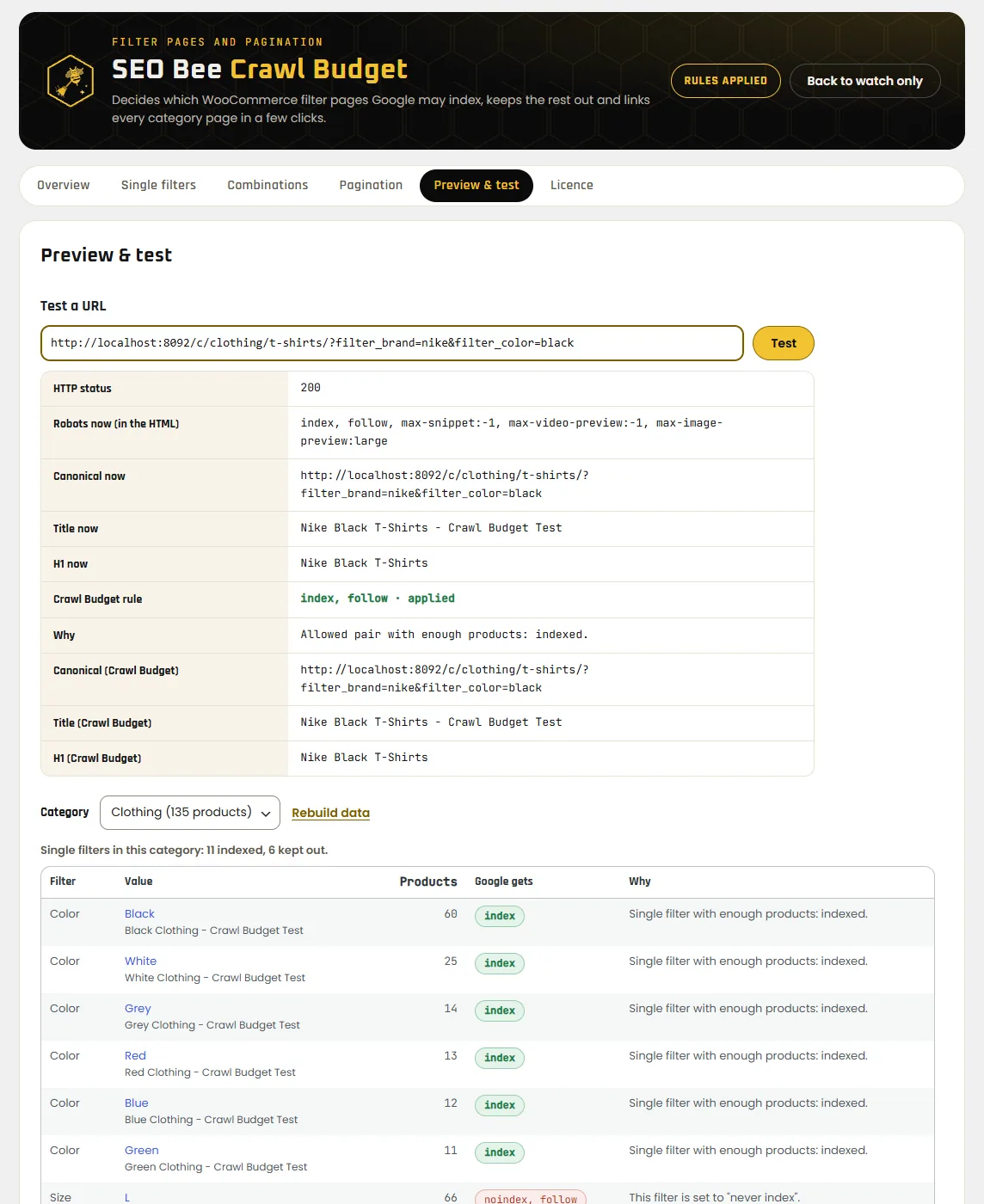
Under Settings → SEO Bee Crawl Budget you decide which attributes may go into the index and which pairs you allow. The “Preview & test” tab then shows the product count of every filter value and what Google would get. Under Licence you start the 14-day trial.
Apply and check
Click “Apply rules”, then “Run safety check” on the Overview. It loads the home page, the shop, a category with its page 2, a product and a page, and confirms that the plugin left them alone.
New versions arrive through the Plugins page, like for any other plugin.
Before you install
Can the plugin push important pages out of the index?
It does not touch categories, products or any address without filter parameters; that is locked in the code. It works only on filter addresses. As long as it is on “Watch only”, it changes nothing there either.
Do I have to switch off Rank Math or Yoast?
No. On filter addresses the plugin changes the tags through the interfaces of Rank Math or Yoast SEO, and on all other pages their tags stay as they are. Without an SEO plugin it writes those tags itself. If another plugin still overrides a rule, the URL test shows a red “Conflict” row.
Does it work with SEO Bee Link Juice?
Yes. Link Juice handles categories, pagination, sorting and search, and Crawl Budget handles the filter pages. When Crawl Budget is active and licensed, Link Juice leaves the filter addresses to it.
Which filters does the plugin recognise?
The WooCommerce parameters: attribute filters (filter_…), brands, tags, price, rating, stock and sorting. Filter plugins with their own addresses such as /category/f/red/ are not recognised. You can still use the pagination there.
Why is the robots.txt block off?
Google no longer fetches a page that robots.txt blocks, so it never sees that page's noindex. Switch the block on only after the filter pages have left the index, which takes a few weeks.
What does the plugin send to seo-bee.de?
Once a day the site's address, the plugin version and the licence key, to check that the licence is valid. Nothing about visitors, orders or customers.
Can I get my money back?
Before buying you have a 14-day trial. After buying you have the 14-day statutory right of withdrawal, unless you expressly ask for the licence to start right away. See right of withdrawal.
Try it on your shop
Installing takes two minutes, the trial runs 14 days. Nothing changes in the shop until you click “Apply rules”.
Download the plugin