
 Bosanski
 Deutsch
SEO Bee Optimiser: WordPress cache plugin
A WordPress plugin for caching and speed. It keeps finished pages as HTML files and sends them to the visitor before WordPress even starts. The first 14 days are free, then it costs 20 € a year for one site.
Version 1.2.0 · WordPress 6.3+ · PHP 7.4+
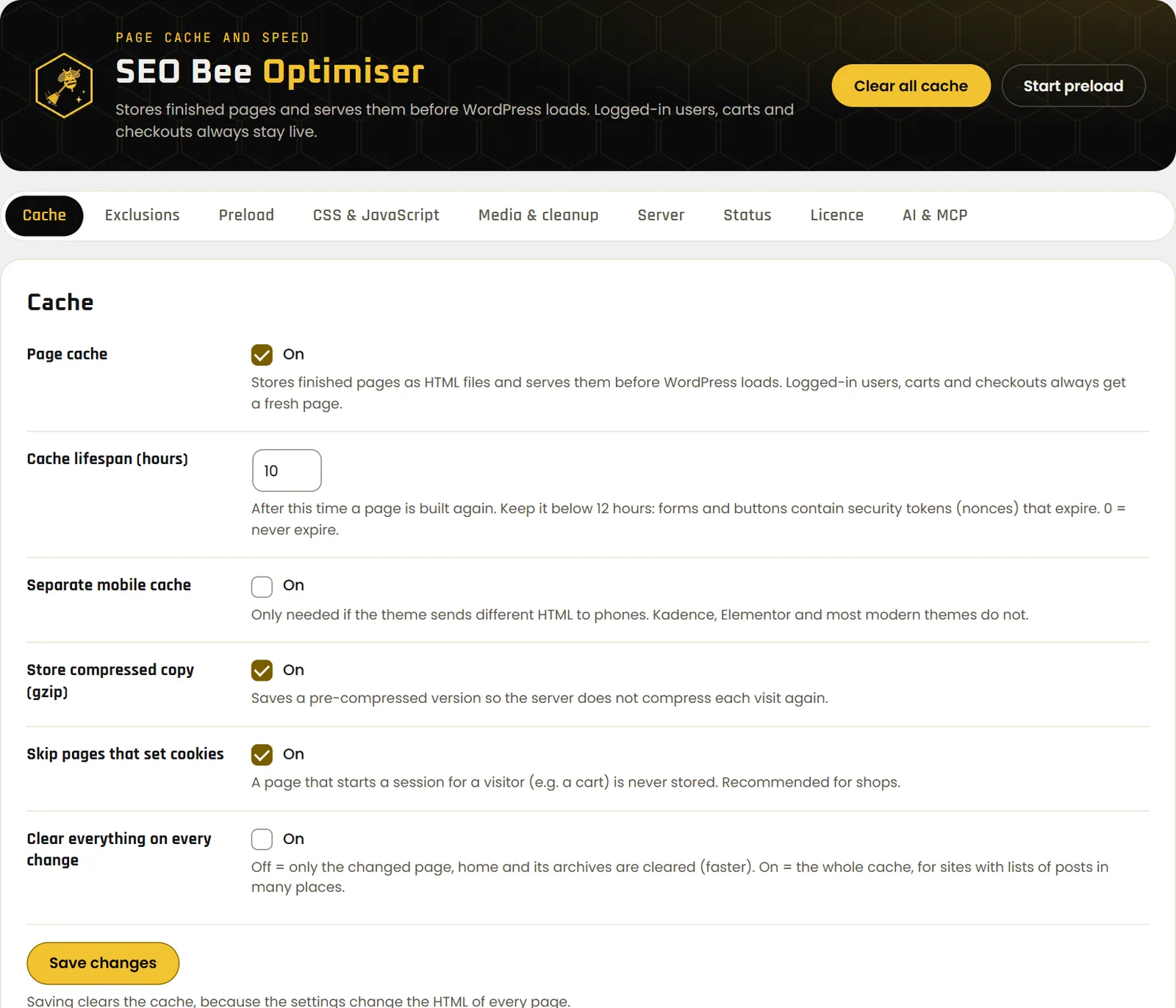
A faster site without the tuning
The defaults are safe for most sites: page cache, lazy-loaded images and no WordPress emojis. Everything else you switch on one at a time, and you see straight away whether the site still works.
Page cache
A page is built once and saved to disk. Every visitor after that gets the finished file, with no PHP and no database. There is a separate mobile cache and a gzip copy as well.
Clears and refills itself
When you change a post, a product, a menu or the theme, the plugin clears only what changed. Then it refills the pages from your sitemap in the background.
CSS, JavaScript and images
Minifies HTML, CSS and JavaScript, defers scripts, holds back analytics and pixels until the first interaction, and lazy-loads images and iframes. The first three images are left alone for the sake of LCP.
Safe with WooCommerce
Logged-in users, the cart, checkout, “My account”, search and POST requests never get a cached page. A page that sets a cookie is not saved.
Server rules
On Apache and LiteSpeed it writes browser caching and gzip/brotli into .htaccess. Deactivating puts .htaccess and wp-config.php back the way they were.
Run it from AI
The plugin has its own REST API and MCP server. Claude Code or another AI agent can read the status, clear the cache, start a preload and change settings.
What changes on the site
Time to first byte (TTFB) is how long the server takes to start sending the page. That is where the plugin helps most.
| Site | Without plugin | With plugin |
|---|---|---|
| Test site with WooCommerce and Elementor, TTFB (median of 10) | 358–598 ms | 6–12 ms |
| Our live WordPress site, TTFB over the internet | 107–159 ms | 92–102 ms |
| Our live WordPress site, Lighthouse mobile | 94 and 99 | 100 and 100 |
On the live site about 80 ms is just the trip across the internet, so the gain is smaller than locally. The plugin does not shrink images: if mobile LCP is slow because of large photos, WebP and smaller dimensions fix that.
14 days free, then 20 € a year
- You start the trial in the plugin with one click, no card and no account.
- The licence covers the site and its copies with
staging.,stage.,dev.ortest.in front. On localhost the plugin runs without a licence. - If the trial ends without a licence, caching switches off. The site keeps working as it did before the plugin, just slower.
- Moving to another site: click “Move licence to this site” in the plugin, and the old site stops caching.
The licence key arrives by e-mail within a few minutes. You also see it in your account if you buy with the same e-mail address. The subscription renews every year and you can cancel any time.
All four plugins for the price of three
- SEO Bee Optimiser, Link Juice, CTR and Crawl Budget: four licence keys, one website each.
- All four run for the same term and renew on the same day.
- If you cancel, all four end on the same date.
- Optimiser runs on any WordPress site. The other three need WooCommerce.
The four keys arrive together in one email.
Three steps
Upload the ZIP
In wp-admin go to Plugins → Add New → Upload Plugin, choose
seo-bee-optimiser.zipand click Activate. If another cache plugin is running (WP Rocket, LiteSpeed Cache, W3TC), deactivate it first.Start the trial
Open Settings → SEO Bee Optimiser → Licence and click “Start free 14-day trial”. Once you buy a licence, you paste the key in the same place.
Check it
Open the site in a private window and look at the
X-SEO-Bee-Cacheresponse header. The first time it says MISS, the second time HIT.
The plugin needs pretty permalinks. New versions arrive like any other plugin update, on the Plugins screen.
Let Claude Code look after the cache
In the plugin's “AI & MCP” tab you create an API key. The plugin shows the ready-made command with your site's address right away. You see the key only once; the database keeps just its hash.
claude mcp add --transport http seo-bee-mysite \
  https://mysite.com/wp-json/seo-bee-optimiser/v1/mcp \
  --header "Authorization: Bearer sbo_…"
After that you can say, for example, “Clear the cache for /contact/ and start a preload” or “Turn on delayed JavaScript and show me the cache status”. The agent gets these tools:
get_status: whether caching is on, how many pages are saved, how many are queuedpurge_cache: the whole cache or one address on your sitestart_preload: refill the cache from the sitemapget_settingsandupdate_settings: read and change settings, unknown ones are refusedget_licence: licence state and expiry date
The same tools are there as a plain REST API under /wp-json/seo-bee-optimiser/v1/, for n8n, scripts or any other LLM. MCP runs over Streamable HTTP, so Cursor, Claude Desktop and other MCP clients work too.
Before you install
What does the plugin send to seo-bee.de?
Once a day: the site address, the plugin version and the licence key, to check that the licence is valid. Nothing about visitors, content or users. If the server can't be reached, caching carries on and the plugin tries again an hour later.
Can it replace WP Rocket?
For the page cache, preloading from the sitemap, minifying, deferred scripts and lazy-loaded images, yes. Keep one cache plugin active at a time: deactivate WP Rocket first, then activate Optimiser and compare the TTFB before and after.
Do I need the SEO Bee app?
No. The plugin works on its own. The SEO Bee app shows you what is slow on the site, and the plugin fixes part of it.
Does it get along with page builders and SEO plugins?
Our test site runs WooCommerce, the Elementor builder, the Kadence theme and Rank Math. When you change the header in Elementor or settings in Rank Math, the cache clears itself.
What if something stops working?
Turn off the option you switched on last; it is usually delayed JavaScript. If that doesn't help, deactivate the plugin: it restores wp-config.php and .htaccess and deletes the cache.
Can I get my money back?
You get a 14-day trial before buying, and 14 days to withdraw after buying, unless you expressly ask at checkout for the licence to start straight away. See right of withdrawal.