
 Bosanski
 Deutsch
SEO Bee CTR: title and meta description for WooCommerce
A WooCommerce plugin that writes titles and descriptions for categories, products, brands and the shop page from patterns. The patterns pull in numbers from your shop: how many products, from what price, which brands. The first 14 days are free, then one site costs €20 a year.
Version 1.0.0 · WordPress 6.3+ · PHP 7.4+ · WooCommerce 8.0+
One pattern instead of hundreds of hand-written titles
With 300 categories and 5,000 products nobody writes every title by hand. Without a pattern a category usually gets only its name and the shop name. With a pattern the title also carries the count, the price or the brand, and those numbers stay current as the shop changes.
Eight page types
Main categories, subcategories, deeper categories, products, the shop page, the home page, brands and tags. Leave a subcategory field empty and it uses the pattern of the level above.
Numbers from the shop
The product count, the lowest and the highest price, the brands and attribute values that come up most, how many items are on sale. A product page can also show its price, the discount in percent, stock status, GTIN and rating.
Parts in square brackets
Anything inside [ ] drops out when its value is missing: no discount, no “now 14 % off”. If a title gets wider than 580 pixels or a description wider than 920, the plugin shortens those parts first.
Stars only from real reviews
The rating appears only when the product has visible customer reviews. Without reviews that part stays empty. The same rule applies to the structured data.
Works with Rank Math and Yoast
The plugin hands its texts to Rank Math or Yoast SEO, so every page has exactly one title tag. Titles someone wrote by hand in Rank Math stay as they are. Without an SEO plugin it writes the tags itself.
Preview and change log
The preview shows what Google gets for real pages of your shop, with the width in pixels. Every saved change is listed with date and user in the change log, also as CSV.
Pattern and result
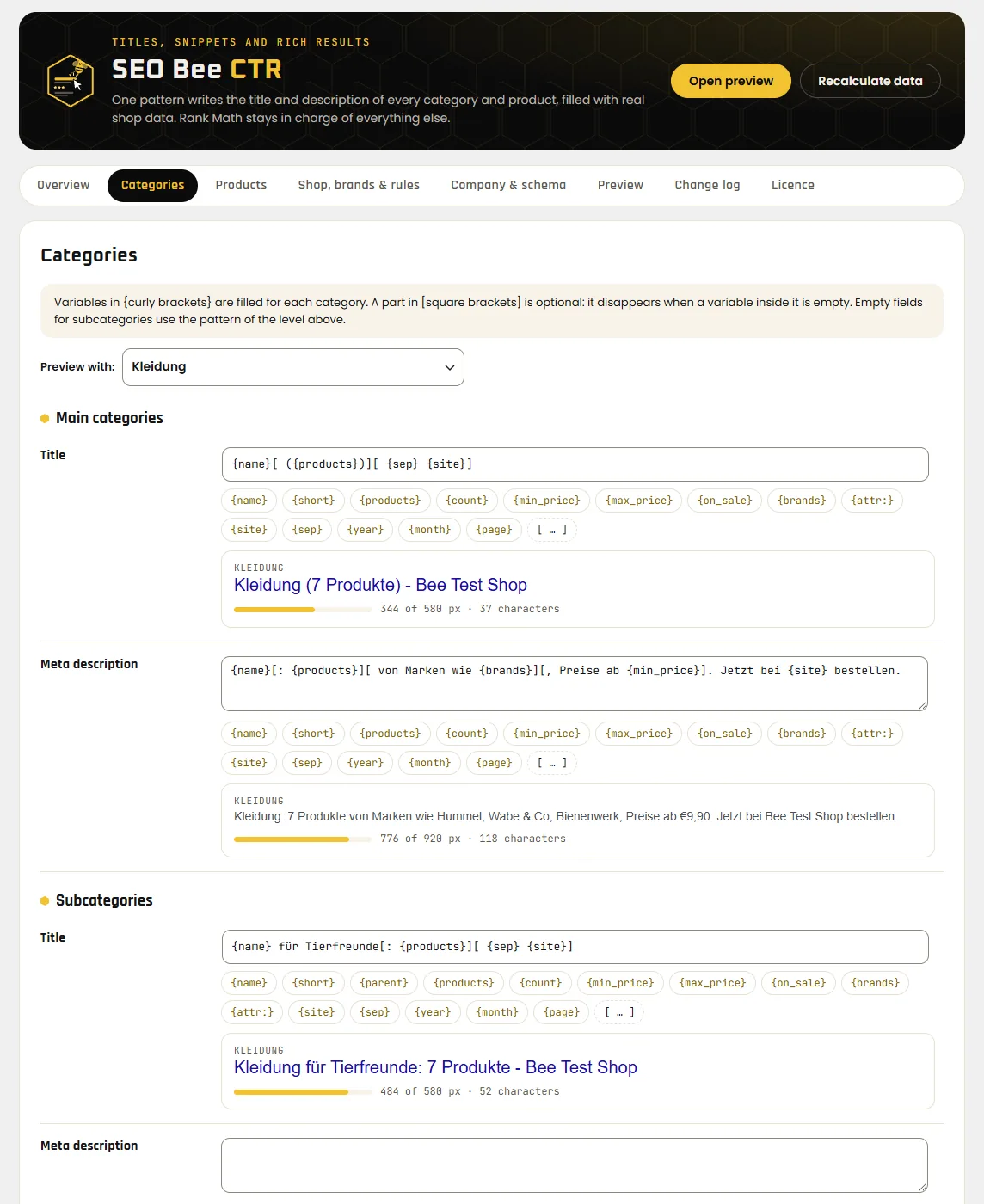
The default patterns and what they produce on our test shop. The test shop is German, so product names, brands and prices come from there.
| Page | Pattern | Result |
|---|---|---|
| Category, title | {name}[ ({products})][ {sep} {site}] | Kleidung (7 products) - Bee Test Shop |
| Category, description | {name}[: {products}][ from brands like {brands}][, prices from {min_price}]. Order now at {site}. | Kleidung: 7 products from brands like Hummel, Wabe & Co, Bienenwerk, prices from €9,90. Order now at Bee Test Shop. |
| Product on sale, title | {short}[, now {sale_percent} off][ {sep} {site}] | Dackel-Liebe T-Shirt, now 14 % off - Bee Test Shop |
| Product with reviews | {short}[ by {brand}][: {price}][, {stock}]. [★ {rating} ({reviews}). ]Order now at {site}. | Dackel-Liebe T-Shirt by Bienenwerk: €24,90, in stock. ★ 4.5 (2 reviews). Order now at Bee Test Shop. |
| Product without reviews | same pattern | Mops im Weltall T-Shirt by Hummel: €29,00, currently sold out. Order now at Bee Test Shop. |
Single categories and products get two fields: a short name for {short}, for example without size and colour, and an own title that replaces the pattern for that page only.
What Google learns about your shop
Enter returns and shipping once under “Company & schema”. The plugin adds them to the structured data that is already on the page.
OnlineStore
The home page describes the shop as an OnlineStore with a return policy and shipping. That is what Google recommends for online shops.
Brand and GTIN
Products get brand and GTIN from WooCommerce. With Rank Math the seller in each offer points to your company with all its data.
No second block
With Rank Math the plugin completes its entries. With Yoast the structured data stays with Yoast. Without an SEO plugin exactly one block for the shop and the website goes on the home page.
Free for 14 days, then €20 a year
- Start the trial in the plugin with one click, without a card or an account.
- The licence covers the site and its copies with
staging.,stage.,dev.ortest.in front. On localhost and addresses ending in.localor.testthe plugin runs without a licence. - If the trial ends without a licence, the old titles, descriptions and structured data come back. Your patterns stay saved.
- Moving to another site: move the licence in the plugin with one click.
The licence key arrives by email within a few minutes. You also see it in your account if you buy with the same email address. The subscription renews every year and you can cancel at any time.
All four plugins for the price of three
- SEO Bee Optimiser, Link Juice, CTR and Crawl Budget: four licence keys, one website each.
- All four run for the same term and renew on the same day.
- If you cancel, all four end on the same date.
- Optimiser runs on any WordPress site. The other three need WooCommerce.
The four keys arrive together in one email.
In three steps
Upload the ZIP
In the WordPress admin open Plugins → Add New Plugin → Upload Plugin, choose
seo-bee-ctr.zipand click Activate. Nothing in the shop changes yet.Start the trial
Open Settings → SEO Bee CTR and under Licence click “Start free 14-day trial”. From then on the patterns apply. Main categories, products, the shop page and brands already have patterns.
Check
The “Preview” tab shows title and description for real pages of your shop. Grey means the page stays as it is. Red means too wide for Google.
New versions arrive on the Plugins page like for any other plugin.
Before you install
Will my click-through rate go up for sure?
Nobody can promise that. Google sometimes rewrites titles itself, and clicks also depend on price, brand and competitors. The plugin makes sure every page has a complete title with real numbers. Whether the click-through rate changes, you see in Search Console. The change log tells you from which day to compare.
Do I have to switch off Rank Math or Yoast?
No. The plugin hands its texts to the SEO plugin. It is tested with Rank Math. Yoast SEO is supported but not yet tested on a real shop. With another SEO plugin, such as SEOPress or AIOSEO, the plugin changes nothing in the shop and shows a notice in the admin.
What happens to titles I already wrote by hand?
Titles and descriptions entered by hand in Rank Math stay. The pattern only fills the other pages. The setting is called “Keep manual Rank Math titles” and is on from the start.
Do the numbers stay current?
Yes. The plugin recalculates product counts, prices and brands when products change. To do it by hand, click “Recalculate data” at the top of the plugin. That also clears the page caches.
What does the plugin send to seo-bee.de?
Once a day the site's address, the plugin version and the licence key, to check that the licence is valid. Nothing about visitors, orders or customers.
Can I get my money back?
Before buying you have a 14-day trial. After buying you have the 14-day statutory right of withdrawal, unless you expressly ask for the licence to start right away. See right of withdrawal.