
 Bosanski
 Deutsch
SEO Bee Link Juice: meta robots and canonical for WooCommerce
A WooCommerce plugin that decides, for every page type in the shop, whether it may be indexed and where its canonical points: categories, page 2 onwards, filters, sorting, search, tags and brands. The first 14 days are free, then one site costs €20 a year.
Version 1.0.0 · WordPress 6.3+ · PHP 7.4+ · WooCommerce 8.0+
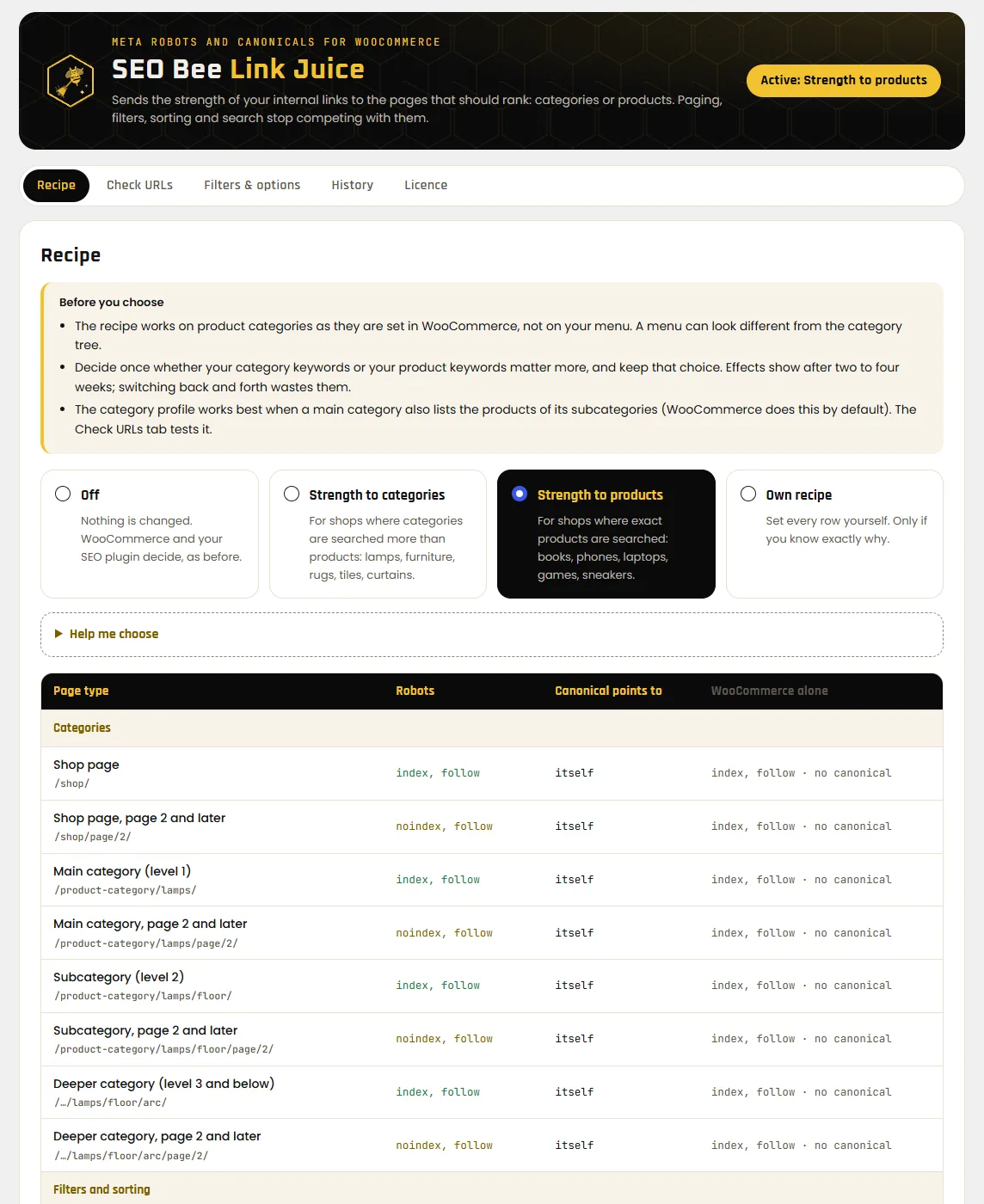
One recipe for every list in the shop
A handful of categories turns into thousands of URLs: every page of the pagination, every filter combination, every sort order. Without a rule they compete with the category that should rank. The plugin gives each kind of list a rule.
Two ready-made profiles
“Strength to categories” suits shops whose customers search for lamps, sofas or tiles. “Strength to products” suits shops where people search for exact names: books, phones, sneakers. Two questions help you choose.
22 page types
Shop, categories on three levels, each with page 2 and later, filters, sorting, search, tags and brands, plus attribute archives. In your own recipe you set every row yourself.
Price stays out
A list with a price range or sorted by price always gets noindex, nofollow, in every profile. Those URLs don't belong in the index.
Works with Rank Math and Yoast
The plugin hands its values to Rank Math or Yoast SEO, so every page keeps exactly one robots tag and one canonical. Without an SEO plugin it writes the tags itself.
Check URLs
One click loads eight real URLs of your shop like a visitor would and shows what the plugin detected and which tags are really in the HTML. It also checks permalinks, the shop page and the licence.
History and export
The last ten recipes are listed with date and user and can be restored. Export a recipe as a file and import it on your other shops.
What the two profiles set
An excerpt from the table. Page 2 onwards means the second and every later page of a list.
| Page | Strength to categories | Strength to products |
|---|---|---|
| Category, page 1 | index, follow · canonical to itself | index, follow · canonical to itself |
| Category, page 2 onwards | noindex · canonical to page 1 | noindex, follow · canonical to itself |
| One filter value | index, follow | index, follow |
| Two or more filter values | noindex, nofollow · canonical to category | noindex, nofollow · canonical to category |
| Sorting, price | noindex, nofollow · canonical to category | noindex, nofollow · canonical to category |
| Search | noindex, nofollow | noindex, follow |
Google advises against pointing page 2 to page 1 with a canonical. The category profile does it anyway because many shops have done well with it. The plugin's table marks such rows with a note and a link to Google. If you want to follow Google, choose “Strength to products” or your own recipe.
Free for 14 days, then €20 a year
- Start the trial in the plugin with one click, without a card or an account.
- The licence covers the site and its copies with
staging.,stage.,dev.ortest.in front. On localhost the plugin runs without a licence. - If the trial ends without a licence, the plugin stops writing tags. The shop then behaves the way WooCommerce and your SEO plugin set it.
- Moving to another site: move the licence in the plugin with one click.
The licence key arrives by email within a few minutes. You also see it in your account if you buy with the same email address. The subscription renews every year and you can cancel at any time.
All four plugins for the price of three
- SEO Bee Optimiser, Link Juice, CTR and Crawl Budget: four licence keys, one website each.
- All four run for the same term and renew on the same day.
- If you cancel, all four end on the same date.
- Optimiser runs on any WordPress site. The other three need WooCommerce.
The four keys arrive together in one email.
In three steps
Upload the ZIP
In the WordPress admin open Plugins → Add New Plugin → Upload Plugin, choose
seo-bee-link-juice.zipand click Activate. Nothing changes yet: the profile starts on “Off”.Pick a profile
Open WooCommerce → SEO Bee Link Juice, pick a profile, tick the box and save. Start the 14-day trial under Licence.
Check
In the “Check URLs” tab click “Check all examples”. The table shows which tags are in the HTML for eight URLs of your shop.
The plugin needs pretty permalinks. New versions arrive on the Plugins page like for any other plugin.
Before you install
Does the plugin add internal links?
No. It only changes meta robots and canonical. Your menu, category tree and content decide which pages get your links. The plugin makes sure pagination, filters and sorting don't compete for that strength.
Do I have to switch off Rank Math or Yoast?
No. The plugin passes its values to the SEO plugin and nothing needs to be switched off there. Tested with Rank Math, Yoast SEO, Kadence and Elementor. With SEOPress, AIOSEO, The SEO Framework and Slim SEO the URL check shows a warning, because two tags could end up on a page.
My shop uses a filter plugin with its own URLs
Filters in the path, such as /category/f/red/, are left to the filter plugin and the plugin changes nothing there. Filter plugins with their own parameters can be added under “Filters & options”.
How often should I change the profile?
Ideally never. Google needs weeks to recalculate the signals. The plugin asks for a tick on every change and warns you if the last switch was less than 90 days ago.
What does the plugin send to seo-bee.de?
Once a day the site's address, the plugin version and the licence key, to check that the licence is valid. Nothing about visitors, orders or customers.
Can I get my money back?
Before buying you have a 14-day trial. After buying you have the 14-day statutory right of withdrawal, unless you expressly ask for the licence to start right away. See right of withdrawal.